The AI answer is missing
On this page
The AI Overview and AI Mode are optional, so there are a few ordinary reasons an answer is not there. Match what you see on the page to a row below.
#If you see a prompt
AI answers are off until you allow them. Above the results, the AI Overview box then says that AI-assisted answers are disabled unless you authorize sending your query and selected result context to the AI provider.
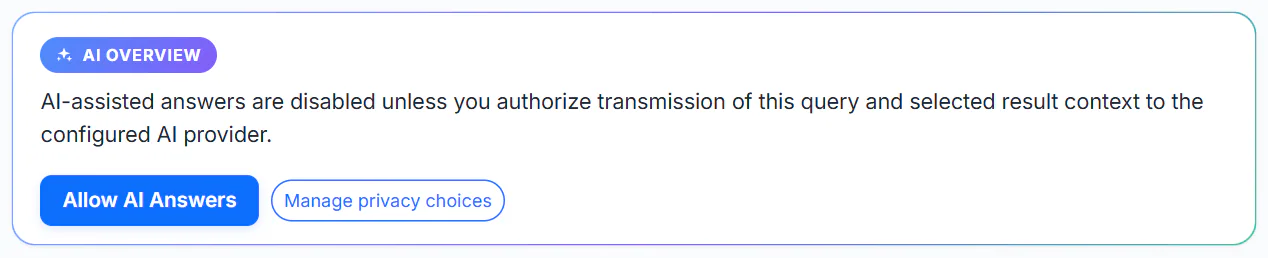
The AI Overview waits for your permission. Allow AI Answers turns on the AI-assisted answers choice.
- 1Allow AI Answers
- 2Manage privacy choices
Select Allow AI Answers. The answer then loads. To read what is sent first, see How AI answers use your question. Manage privacy choices opens the full panel, and you can switch the choice off there at any time. See Your privacy choices.
In AI Mode, when you send a message, the same step reads Turn on AI answers to chat. with an Allow AI answers button. Your message is sent once you allow it.
#Other messages and what to do
| What you see | What it means | What to do |
|---|---|---|
| Please confirm you are human above the answer | The site wants you to press and hold a button before it serves AI answers | See The "Please confirm you are human" check |
| The AI provider took too long to answer. or The AI provider is temporarily busy. | The service that writes the answers was slow or overloaded | Select Retry AI overview, or try again in a moment |
| The AI provider is temporarily unavailable. | The service is down for now | Retry later. The regular results below are still there |
| AI answers are temporarily unavailable because the provider quota has been reached. | The site has reached a usage limit | Try again later |
| The AI overview could not be loaded. The regular search results are still available; please try again. | The request failed | Retry, and check your connection |
| AI-assisted results are not configured for this deployment. or AI Mode is not available right now | This site does not have AI answers turned on | Nothing to fix. Use the regular results |
| AI Mode is switched off right now. or AI Mode is not available for this connection. | AI Mode is off, or not offered for your connection | Try again later |
| This chat has reached its message limit. Start a new chat to keep going. | A chat holds a fixed number of messages | Select Start a new chat |
| You are sending messages quickly. Wait a moment and try again. | Too many messages in a short time | Wait a moment |
| That message is too long. Shorten it and try again. | The message is over the length limit | Shorten it |
#There is no AI Overview box at all
The AI Overview appears above the results of the All, Web, News, Shopping and Websites tabs, when you have searched for something. It is not shown above Images or Videos, or when the search box is empty. On Finance and Politics pages the summary has its own name, such as AI Market Summary.
#About the chat limit
AI Mode counts your messages with a counter beside the message box. When it is full, a notice says the chat has reached its limit and that your conversation stays on screen until you start a new chat. Use Start a new chat. Your old conversation is cleared when you do, so copy anything you need first. Save puts the chat in a file on your device.
#Common questions
Why does the AI Overview ask for permission every time?
It should ask only until you allow AI answers. If it keeps asking, your browser is not keeping the choice. See My choices, followed items or settings are not remembered.
I allowed AI answers but still see nothing.
Wait a few seconds: the answer loads after the page. If an error message appears, use the table above. If the human check appears, complete it.
Can I get an AI answer on a site that says it is not configured?
No. On that site AI answers are not turned on. The regular search works as usual.